tag #navbar-iframe { display: none !important; }

Techgeekko

Games ,apps and more for android and PC

Pages

  • Home
  • Jelly Bean upgrade
  • Lollipop For Galaxy s2

31/03/2013

Top apps for galaxy s2

These are the top 50+ apps after reviewing them one by one.

If you need any app from the given screen shot , just comment.

Hope you like them.

Posted by Akshay at 11:16 No comments:
Email ThisBlogThis!Share to XShare to FacebookShare to Pinterest
Labels: apps, S2, s3

17/12/2012

Iphone Ios 6 themed new MiUi Rom (with Mi-Voice)


FAST & STABLE WITH MI-VOICE
Changelogs (v2.1 | v2.2) :
based on the current MIUI stock-rom
language (DE|EN) by Andy25 - many thx.
new dream-kernel with good battery-life
system new optimized
complete 100 % themed
Mi-Voice (iOS6 Edition v2.2 - coming soon)
3-way-reboot
iOS popup apk
iOS keyboard
new MIUI-bootanimation
Samsung email (included Widget) in iOS6 theme
iOS animated weather-lockscreen (by Moviestar)
9s Weather (is required for animated weather-lockscreen)
Fancy Widgets
AdAway (ad blocking)
Dropbox
Adobe Flashplayer
Easy mp3 Musicdownload
Youtube (themed)
and more ...


Small bug :
super video (video popup) have fc - I removed it in v2.2

Video:
http://www.youtube.com/watch?v=txeZmQG1tGs&feature=player_embedded

Download:
http://foonode.net/file/5n6h (faster one)
                          OR
http://www.multiupload.nl/65LS0E3FTT


Posted by Akshay at 19:28 No comments:
Email ThisBlogThis!Share to XShare to FacebookShare to Pinterest
Labels: Android, android 4.0, DIY, ios, ios theme, miui, rom, rooting, S2, upgrade

24/08/2012

How to maximize C++ in Windows 7


Below Is the step-by-step procedure how to install Turbo C++ on 64 bit or 32 bit Windows 7.
1. Install the software DOSBox ver 0.74 : download here
2. Create a folder,for example „Turbo“ (c:Turbo)
3. Download and extract TC into the Turbo folder (c:Turbo): download here
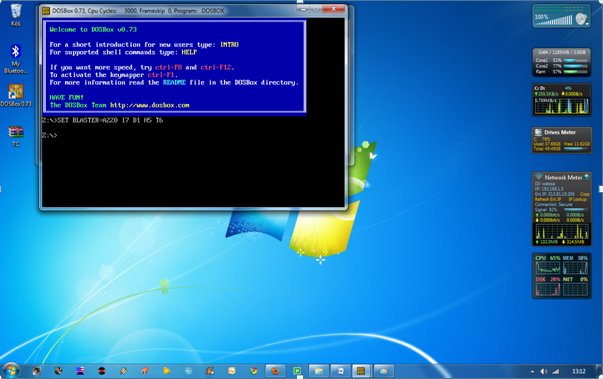
4. Run the DOSBox 0.74 from the icon located on the desktop:
steps to install dosbox 0 74 in window 7
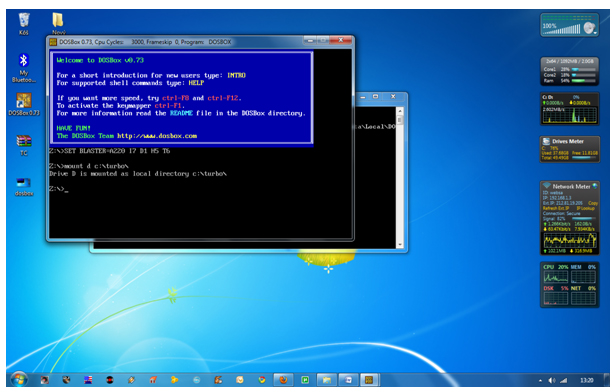
5. Type the following commands at the command prompt [Z]: mount d c:Turbo
[The folder TC is present inside the folder Turbo]
Now you should get a message which says:
Drive D is mounted as a local directory c:Turbo
install turbo c++ on Windows 7 64bit,turbo c++ in full screen ,c++,turbo c in fullscreen on windows 7,C++ tips and tricks,cool tips and tricks, how tos, c++ in  full screen on windows 7, TECHNOLOGY,
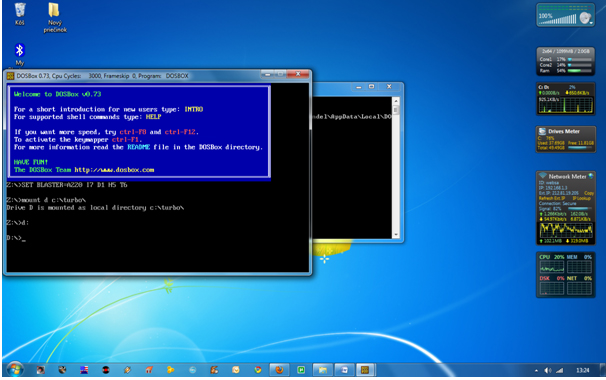
6. Type d: to shift to d:
install turbo c++ on Windows 7 64bit,turbo c++ in full screen ,c++,turbo c in fullscreen on windows 7,C++ tips and tricks,cool tips and tricks, how tos, c++ in  full screen on windows 7, TECHNOLOGY,
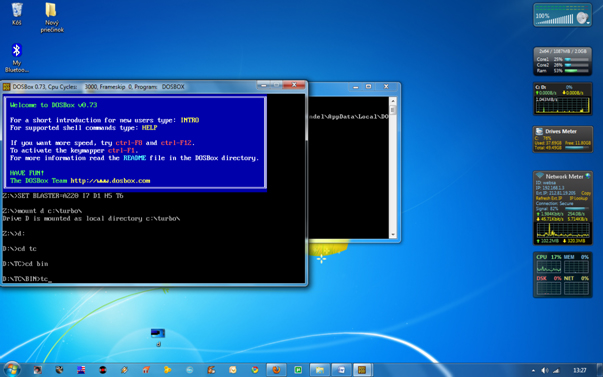
7. Next follow the commands below:
cd tc
cd bin
tc or tc.exe [This starts you the Turbo C++ 3.0]
install turbo c++ on Windows 7 64bit,turbo c++ in full screen ,c++,turbo c in fullscreen on windows 7,C++ tips and tricks,cool tips and tricks, how tos, c++ in  full screen on windows 7, TECHNOLOGY,
8. In the Turbo C++ goto Options>Directories>
Change the source of TC to the source directory
[D] ( i.e. virtual D: refers to original c:Turbo .
So make the path change to something
like D:TCinclude and D:TClib respectively )

How to start TurboC++ in the DOSBox automatically:

You can save yourself some time by having DOSBox automatically mount
your folders and start TurboC++:
For DOSBox versions older then 0.74 browse into program installation folder and open the
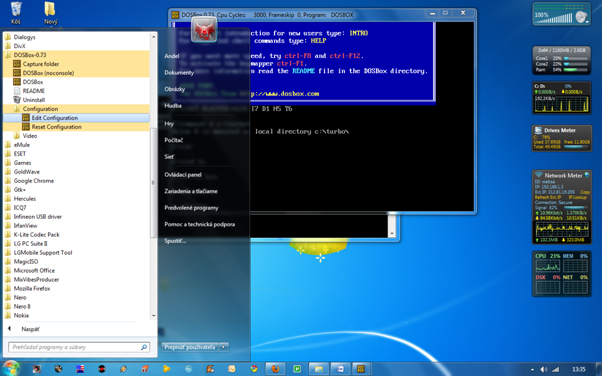
dosbox.conf file in any text editor. For version 0.74 go to Start Menu and
click on “Configuration” and then “Edit Configuration“.
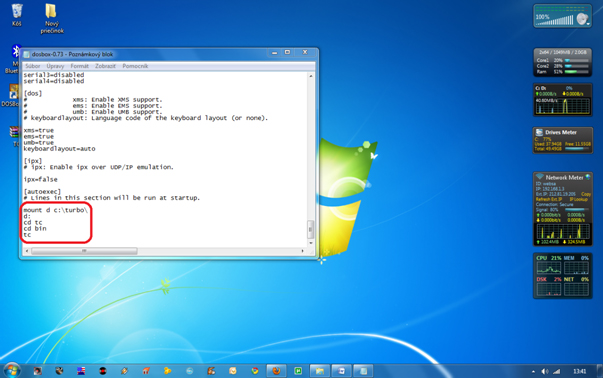
Then scroll down to the very end, and add the lines
which you want to automatically execute when DOSBox starts.
Automatically mount and start Turbo C++3.0 in DOSBox ver 0.74:
install turbo c++ on Windows 7 64bit,turbo c++ in full screen ,c++,turbo c in fullscreen on windows 7,C++ tips and tricks,cool tips and tricks, how tos, c++ in  full screen on windows 7, TECHNOLOGY,
Scroll down to the very end, and add the lines:
install turbo c++ on Windows 7 64bit,turbo c++ in full screen ,c++,turbo c in fullscreen on windows 7,C++ tips and tricks,cool tips and tricks, how tos, c++ in  full screen on windows 7, TECHNOLOGY,
Those commands will be executed automatically when DOSBox starts!
Please note:
Full screen: Alt and Enter
When you exit from the DosBox [precisely when u unmount the virtual drive where
Turbo C++ 3.0 has been mounted] all the files you have saved or made changes in
Turbo C++ 3.0 will be copied into the source directory
(The directory which contains TC folder)
Don’t use shortcut keys to perform operations in TC because they might be a
shortcut key for DOSBOX also . 
Eg : Ctrl+F9 will exit DOSBOX rather running the code 
Posted by Akshay at 19:27 4 comments:
Email ThisBlogThis!Share to XShare to FacebookShare to Pinterest
Labels: DIY, Important, softwares, Tricks, Windows
Newer Posts Older Posts Home
Subscribe to: Posts (Atom)
by Akshay Sharma

Techgeekko Search

Popular Posts

  • Samsung Network/Sim Unlock Code Generator/Patcher (SGS1/2/3)
    Today we present a unified/streamlined and simple as (some words here) SIMLOCK/NetworkLock unlock code generator by stock+ team! Mytool g...
  • iOS 6 themed rom(Miui) for Galaxy s2 (really great
    Fast and Stable | The first Rom with Mi-Voice Changelogs (v2.1 | v2.2) : based on the current MIUI stock-ro...
  • GameCIH(Cheating engine for Android)
    http://forum.xda-developers.com/showthread.php?t=1478806  V-Unknown- @Bo2 I decided to introduce this app to those of you that ...
  • How to maximize C++ in Windows 7
    Below Is the step-by-step procedure how to install Turbo C++ on  64 bit or 32 bit Windows 7 . 1. Install the software  DOSBox  ver...
  • How to: Make your own USB OTG cable for an Android smartphon
    Some high-end Android phones and most of today’s Android tablets support USB OTG (On-The-Go). This enables users to connect a standar...
  • DIY USB OTG CONVERTER FOR i9100! IT WORKS!
      DIY USB OTG CONVERTER FOR i9100! IT WORKS! The most Micro USB to USB converters are not work if you want to use it for OTG converter,...
  • Iphone Ios 6 themed new MiUi Rom (with Mi-Voice)
    FAST & STABLE WITH MI-VOICE Changelogs (v2.1 | v2.2) : based on the current MIUI stock-rom language (DE|EN) ...

Blog Archive

  • ▼  2015 (2)
    • ▼  March (1)
      • How to make boot animation for android
    • ►  February (1)
  • ►  2013 (4)
    • ►  June (2)
    • ►  May (1)
    • ►  March (1)
  • ►  2012 (22)
    • ►  December (1)
    • ►  August (3)
    • ►  July (8)
    • ►  June (1)
    • ►  May (3)
    • ►  April (6)

Total Pageviews

AkG&S. Powered by Blogger.