tag #navbar-iframe { display: none !important; }
Showing posts with label softwares. Show all posts

24/08/2012

How to maximize C++ in Windows 7


Below Is the step-by-step procedure how to install Turbo C++ on 64 bit or 32 bit Windows 7.
1. Install the software DOSBox ver 0.74 : download here
2. Create a folder,for example „Turbo“ (c:Turbo)
3. Download and extract TC into the Turbo folder (c:Turbo): download here
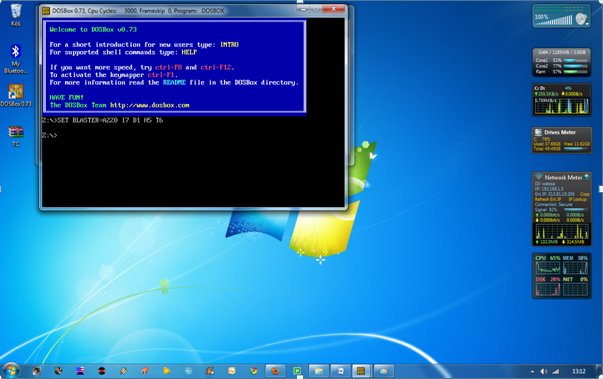
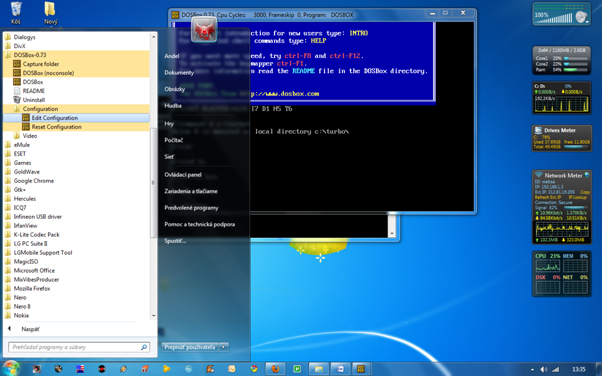
4. Run the DOSBox 0.74 from the icon located on the desktop:
steps to install dosbox 0 74 in window 7
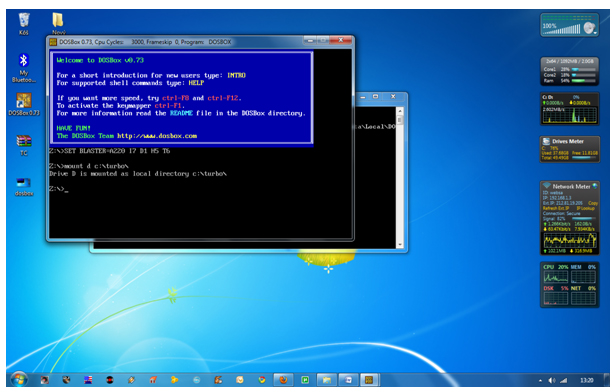
5. Type the following commands at the command prompt [Z]: mount d c:Turbo
[The folder TC is present inside the folder Turbo]
Now you should get a message which says:
Drive D is mounted as a local directory c:Turbo
install turbo c++ on Windows 7 64bit,turbo c++ in full screen ,c++,turbo c in fullscreen on windows 7,C++ tips and tricks,cool tips and tricks, how tos, c++ in  full screen on windows 7, TECHNOLOGY,
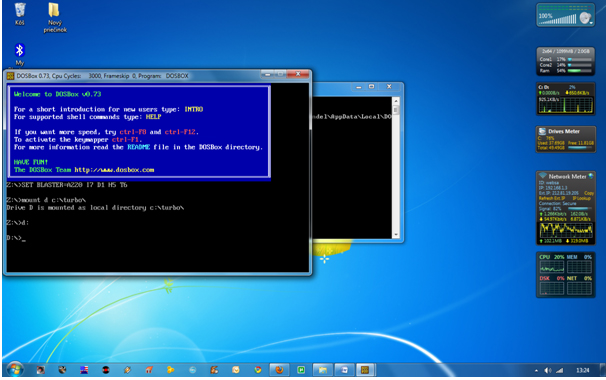
6. Type d: to shift to d:
install turbo c++ on Windows 7 64bit,turbo c++ in full screen ,c++,turbo c in fullscreen on windows 7,C++ tips and tricks,cool tips and tricks, how tos, c++ in  full screen on windows 7, TECHNOLOGY,
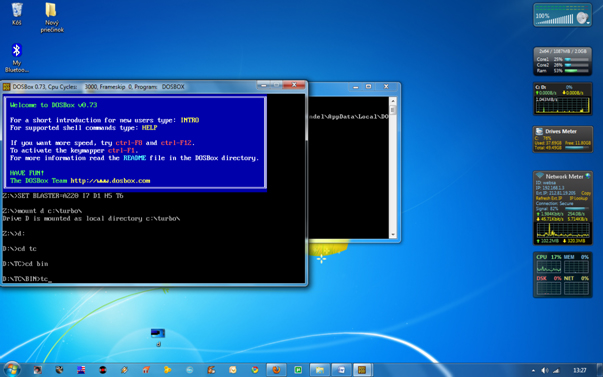
7. Next follow the commands below:
cd tc
cd bin
tc or tc.exe [This starts you the Turbo C++ 3.0]
install turbo c++ on Windows 7 64bit,turbo c++ in full screen ,c++,turbo c in fullscreen on windows 7,C++ tips and tricks,cool tips and tricks, how tos, c++ in  full screen on windows 7, TECHNOLOGY,
8. In the Turbo C++ goto Options>Directories>
Change the source of TC to the source directory
[D] ( i.e. virtual D: refers to original c:Turbo .
So make the path change to something
like D:TCinclude and D:TClib respectively )

How to start TurboC++ in the DOSBox automatically:

You can save yourself some time by having DOSBox automatically mount
your folders and start TurboC++:
For DOSBox versions older then 0.74 browse into program installation folder and open the
dosbox.conf file in any text editor. For version 0.74 go to Start Menu and
click on “Configuration” and then “Edit Configuration“.
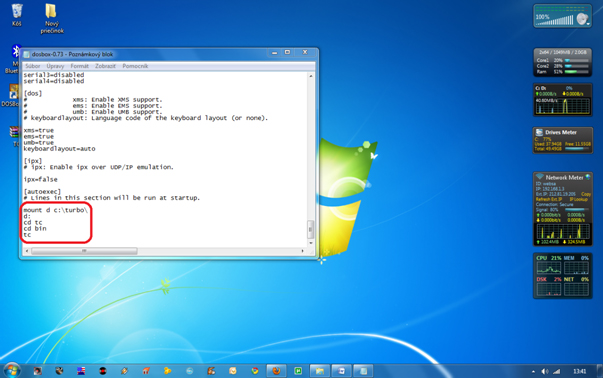
Then scroll down to the very end, and add the lines
which you want to automatically execute when DOSBox starts.
Automatically mount and start Turbo C++3.0 in DOSBox ver 0.74:
install turbo c++ on Windows 7 64bit,turbo c++ in full screen ,c++,turbo c in fullscreen on windows 7,C++ tips and tricks,cool tips and tricks, how tos, c++ in  full screen on windows 7, TECHNOLOGY,
Scroll down to the very end, and add the lines:
install turbo c++ on Windows 7 64bit,turbo c++ in full screen ,c++,turbo c in fullscreen on windows 7,C++ tips and tricks,cool tips and tricks, how tos, c++ in  full screen on windows 7, TECHNOLOGY,
Those commands will be executed automatically when DOSBox starts!
Please note:
Full screen: Alt and Enter
When you exit from the DosBox [precisely when u unmount the virtual drive where
Turbo C++ 3.0 has been mounted] all the files you have saved or made changes in
Turbo C++ 3.0 will be copied into the source directory
(The directory which contains TC folder)
Don’t use shortcut keys to perform operations in TC because they might be a
shortcut key for DOSBOX also . 
Eg : Ctrl+F9 will exit DOSBOX rather running the code 

14/07/2012

Samsung Network/Sim Unlock Code Generator/Patcher (SGS1/2/3)


Today we present a unified/streamlined and simple as (some words here) SIMLOCK/NetworkLock unlock code generator by stock+ team!

Mytool generates ORIGINAL unlock code without modyfying any files!(like most of unlocker program does)
or PATCHES The file directly, removing simlock without code!

Feel free to read README.NOW file and post your comments / infos here!


Link:

Download Version (1.4-GPU/Patch) With UI (as on screenshot)

If you like it, consider donation by clicking "donate" button in my profile 


Quote:
Version History:

- 1.4
* Galaxy S 2 flashing H/W 1.5+ support added.
* Unlocker confirmed to work also on Samsung Captivate (US version of SGS1), just choose I9000 when you want to generate code.

- 1.3
* Added direct patch method for Galaxy S 3 devices.
* Code optimization.
* More GFX card support added to hash cracking module.

- 1.2
* Added direct patch method for Galaxy S 2 devices (if you your code cant be generated or you dont have proper GPU, use this method - Read README.TXT before)
* Patching method confirmed working on HV 1.4+ version !

- 1.1
* Added GPU supported/not supported message

- 1.0
* Requires Windows .NET Framework v4
* Support for Galaxy S II Added
* Nice UI added
* ATI RV 7X0 card or nVidia 'CUDA' one (G80+) required to decrypt pass in this release. Next version will not use GPU but it will be slower. For these who dont have supported GPU, please wait.
* Warning: if generated code will not work for a first time when you are sure you typed it correctly, report it to us and stop trying, your phone will lock out after 3 unsuccessful unlock tries.

HOW TO RE-LOCK SAMSUNG GALAXY S (GT-I9000) (FOR WARRANTY PURPOSES ONLY)
Quote:
After you get the Unlock code using our tool, enter: *7465625*638*#
Pop-up box will show up. Complete the first field (MCC/MNC) with the network you want your phone locked to (for example 260 03 where 226 = Poland; 03 = orange etc.) and the second field (Control Key) with the Generated Unlock Code.
After pressing OK, your phone should relock.

READ THIS!

ALWAYS DO BACKUP OF EFS PARTITION BEFORE REPLACING FILES IN THIS DIRECTORY !!
I'M NOT TAKING RESPONSIBILITY FOR DATA LOSS!
REPLACING NV_DATA.BIN WITH BROKEN VERSION MAY CAUSE YOUR IMEI LOST! - YOU HAVE BEEN WARNED!
[


Enjoy and Happy unlocking!!
stock+ Team

06/04/2012

Microsoft Releases “Fix It” Portable Troubleshooting Tool to Automatically Fix Windows Problems


Many times you need to fix a computer system which doesn't have Internet connection and you can't download these Fix It tools in that system to fix the problem. In such situation a new portable version of Fix It might come very handy.
Microsoft_Fixit_Logo.png
Microsoft has released a portable version of Fix It which can be carried on USB drive and then you can fix any computer system without any need of Internet connection or download several Fix It tools one by one.
To use this new portable version, first you need to download the main setup file from following link:
After downloading, run the EXE file and it'll download the full Fix It tools archive on your system. You can save the folder in any desired location or on your USB device.
It takes a few seconds in downloading the files and its a one-time process only. Once the download completes, you can run "Launch Fix it.exe" file to start Fix It portable version.
The main interface shows links to all available Fix It tools as shown in following screenshot:
Microsoft_Fix_It_Portable_Tool.png
Click on "Run Now" button given near the issue which is related to your problem and it'll automatically start the troubleshooter. Follow the instructions given by the troubleshooter and you'll be able to fix your problem.
Following are main areas which are covered by these automatic troubleshooters:
  • Aero Theme
  • Audio Playback
  • Audio Recording
  • CD/DVD
  • Codecs
  • Devices
  • Display Quality
  • Exchange Connected
  • IE Add-on
  • IE Performance
  • Maintenance
  • Malware
  • MSN Client
  • Performance
  • Pictures
  • Power
  • Printing
  • Program Install and Uninstall
  • Windows Search
  • Windows Firewall
  • Windows Files/Folders
  • Windows Media Player
  • Windows Security
  • Windows USB
  • Windows Phone 7 or Zune
  • Windows Update
All these Fix It portable troubleshooter tools are stored in "Fix it portable\Resources\Troubleshooters" folder. You can also directly run any of them from there if required.
Its really very handy portable utility which might come very useful in many situations. A must have tool to carry in your USB drive.